Picratch
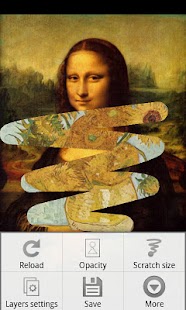
And an upper layer comes to have been scratched when rubbed a screen with a finger.Can make the following pictures.
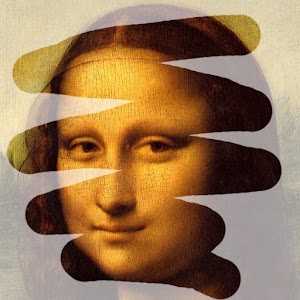
* The picture which scratched.
* The picture which wrote a text to the clouded windowpane with a finger.
* The picture which stacked the filter of a color or the image.
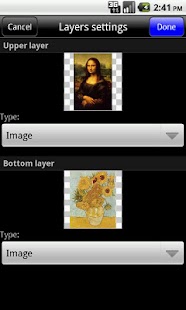
The combinations of the layer are as follows.
* Color and Color * Image and Color * Color and Image * Image and Image
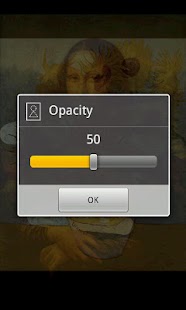
The upper layer can appoint "Opacity".It approaches transparently when lower the opacity.
Can give the effect that put a semitransparent photograph and picture, the filter of the color when use this function.
== More infomation ==http://skyarts.com/products/android/picratch/
== About "Picratch" ==It is the words that merged "Scratch" with "Picture"!
;-)
== About the license certification ==For illegal copy prevention, work connect to the server at the time of first start and license it, and to authenticate it.The following things are thought about when error "999" appears at the time of the license certification.
* Because communication facility becomes invalid, certification processing is not possible.
-> Please validate communication facility.
It is OK in WiFi.
* Because "market" application gives an error, certification processing is not possible.
-> May be recovered when you uninstall update of the (Android) "Market" application.
-> When the password of "Accounts & sync" of the setting window is not input or disappear, it occurs.When you hold "Accounts & sync" of the setting window, and it is demanded password input, it is thought that it is caused by this.
About Picratch
- Package name (App ID)
- com.skyarts.android.picratch
- Available on
- Google Play
- Price
- Free
- Version
- v1.5
Looking for the Picratch APK?
The safest way to get Picratch (com.skyarts.android.picratch) on your Android device is to install it directly from Google Play — you'll always get the latest official version, automatic updates, and no risk of modified or infected APK files from third-party sites.
Social Features
Connect and share with friends and the community.
Camera Features
Advanced camera features with editing capabilities.
Productivity Tools
Boost your productivity with powerful tools and features.
See Picratch in Action
Frequently Asked Questions
Is Picratch free?
Yes, Picratch is free to download and install on Android through Google Play.
How do I install Picratch on Android?
Open Google Play on your Android phone or tablet, search for Picratch or tap the Google Play button on this page, then tap Install. The app downloads and installs automatically.
What is com.skyarts.android.picratch?
com.skyarts.android.picratch is the App ID (package name) of Picratch on Google Play. Every Android app has a unique package name, and it is the safest way to verify you are installing the official app.
Is Picratch safe to download?
Installing Picratch from Google Play is the safest option: you get the official version, verified by Google Play Protect, with automatic updates. Avoid APK files from unofficial third-party sites.
Get Picratch Today
Picratch for Android — free download on Google Play.
Compatible with Android phones and tablets — available on Google Play.
Ask AI about this app
Get instant answers about features, tips and more from popular AI assistants.